What Is MCP? A Practical History of How AI Learned to Use Tools
This post is part of the Let the AI Out series on giving AI agents direct access to hardware. Start here for the overview.
AI didn’t suddenly “learn how to use tools.”
For a long time, models were basically very good autocomplete engines trapped inside chat boxes. You could ask them to explain code, design APIs, sketch architectures, even reason about complex systems — but the moment you wanted them to do something, you were back in copy/paste land.
Then things started to change.
Agents appeared. Tool use appeared. Sandboxed runtimes. Plugins. Function calling. Remote APIs. Headless browsers. File systems. Shells. Databases. Hardware. The model was no longer just talking about the world — it was starting to touch it.
That shift created a new problem:
How do you give AI models a safe, structured, composable way to interact with real systems?
Model Context Protocol (MCP) is one of the most pragmatic answers to that question so far. Some people call it “the USB-C of AI” — one standard connector instead of a drawer full of proprietary cables.
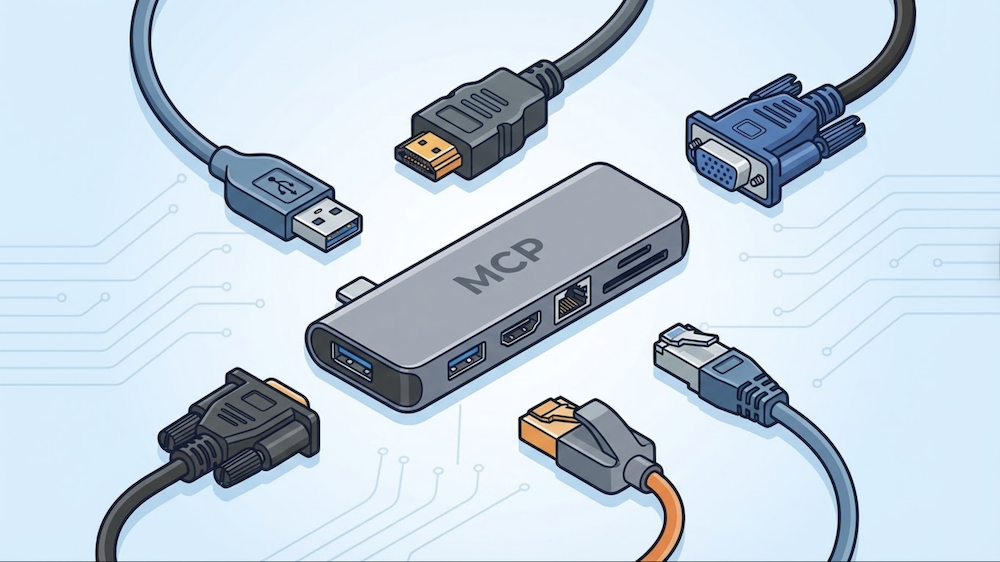
This post is a short, practical history of MCP: where it came from, what problem it’s solving, how it works today, and why it matters if you’re building tools, agents, or real-world AI workflows.
Before MCP: the N×M problem
Early “tool use” for LLMs was… improvised.
You’d see patterns like:
- Hardcoded function calling schemas
- Ad-hoc plugin systems (remember ChatGPT plugins?)
- One-off agent frameworks with incompatible tool abstractions
- Prompt hacks to coerce valid JSON
- Glue code the model itself had no awareness of
It worked — but nothing interoperated. Every AI application needed a custom integration for every external system. If you had N applications and M tools, you needed N×M integrations.
Every app talks to every tool with bespoke glue code. 3 apps × 3 tools = 9 integrations. Now imagine 50 of each.
Tools written for one agent runtime couldn’t be reused in another. Debugging was opaque. There was no shared mental model for what a “tool” even was.
At the same time, models were getting good enough at reasoning that the bottleneck wasn’t intelligence anymore — it was interfaces.
Powerful models, broken loops.
Where MCP came from
If this problem sounds familiar, it should. The software world has solved it before.
In the early days of code editors, every editor needed a custom integration for every programming language. Want Go support in VS Code? Someone had to build it from scratch. Want the same thing in Vim? Start over. N editors × M languages = pain.
Then Microsoft introduced the Language Server Protocol (LSP) — a standard interface between editors and language tooling. Build one language server, and every LSP-compatible editor gets autocomplete, go-to-definition, diagnostics, and refactoring for free.
MCP takes the same idea and applies it to AI agents and external systems.
In November 2024, Anthropic open-sourced MCP — a protocol for giving AI models a standardized way to discover and interact with tools, data, and services. It shipped with SDKs in Python and TypeScript, along with pre-built servers for systems like GitHub, Slack, Postgres, and Google Drive.
The bet was the same one LSP made: if you standardize the interface, the ecosystem compounds.
With MCP in the middle, each app and each tool only needs one integration. 3 + 3 = 6 instead of 9. At scale, that’s the difference between “possible” and “impossible.”
How MCP actually works
MCP is not an agent framework. It’s a protocol, built on JSON-RPC 2.0, with a clear client–server architecture.
The architecture
There are three roles:
- Host — the application the user interacts with (Claude Desktop, VS Code, your custom app). Not the “agent” itself — it’s the environment the agent lives in.
- Client — lives inside the host, manages connections to one or more servers
- Server — a lightweight process that exposes capabilities to the AI model
(Claude, VS Code, etc.)"] H --> C1["MCP Client"] H --> C2["MCP Client"] C1 -->|"stdio"| S1["⚙️ MCP Server
(local tools)"] C2 -->|"HTTP"| S2["⚙️ MCP Server
(remote API)"] style U fill:#1a365d,stroke:#63b3ed,stroke-width:2px,color:#fff style H fill:#2d1b69,stroke:#b794f4,stroke-width:2px,color:#fff style C1 fill:#4a1942,stroke:#f687b3,stroke-width:2px,color:#fff style C2 fill:#4a1942,stroke:#f687b3,stroke-width:2px,color:#fff style S1 fill:#1a365d,stroke:#63b3ed,stroke-width:2px,color:#fff style S2 fill:#1a365d,stroke:#63b3ed,stroke-width:2px,color:#fff
The host launches clients. Each client connects to a server over one of two transports:
- stdio — for local servers. The host spawns the server as a subprocess and talks to it over stdin/stdout. Simple, fast, no ports.
- Streamable HTTP — for remote servers. Standard HTTP with support for streaming responses via SSE. Works across networks.
When a client connects, it and the server negotiate capabilities. Then the model can start using what’s available.
The three primitives
MCP isn’t just about calling functions. It exposes three distinct types of capabilities:
Tools — actions the model can take. These are model-controlled: the AI decides when to call them based on context. Think: github.create_issue, db.query, ble.scan_start.
Resources — data the application can pull in as context. These are application-controlled: the host decides when to fetch them, not the model. Think: file contents, API responses, database records — anything the model might need to reason about but shouldn’t have to “call” for.
Prompts — reusable instruction templates the server provides. These give the model pre-built workflows or best practices for common tasks. Think: “summarize this PR,” “debug this BLE characteristic,” “explain this query plan.”
Model-controlled actions"] S --> R["📄 Resources
App-controlled context"] S --> P["💬 Prompts
Reusable templates"] style S fill:#4a1942,stroke:#f687b3,stroke-width:2px,color:#fff style T fill:#2d1b69,stroke:#b794f4,stroke-width:2px,color:#fff style R fill:#1a365d,stroke:#63b3ed,stroke-width:2px,color:#fff style P fill:#1a365d,stroke:#63b3ed,stroke-width:2px,color:#fff
Most people think of MCP as “tool calling.” That’s the most visible part, but resources and prompts are what make it a context protocol — not just an action protocol.
Why MCP matters
MCP isn’t exciting because it’s a protocol.
It’s exciting because it changes what “AI integration” looks like in practice.
Instead of: “We bolted an LLM onto our system.”
You start getting: “We exposed our system as capabilities the model can reason about.”
That’s a subtle but important shift.
It means:
- Your infrastructure becomes legible to models
- Your APIs become part of the model’s action space
- Your data becomes pullable context
- Your workflows become something the agent can participate in
And because it’s a shared protocol, a tool you build once works everywhere — Claude, ChatGPT, Copilot, Cursor, your own custom agent. Build the server, get the ecosystem for free.
One way to think about MCP is as an abstraction boundary between reasoning and execution. The model reasons in language. MCP gives it a typed, inspectable surface to act on real systems — without embedding system-specific logic into the model itself. That separation turns out to be the difference between “AI that demos well” and “AI that can actually be embedded into production workflows.”
The adoption story
When Anthropic launched MCP in November 2024, the obvious question was: will anyone else adopt this, or is it just another proprietary SDK dressed up as a standard?
The answer came fast.
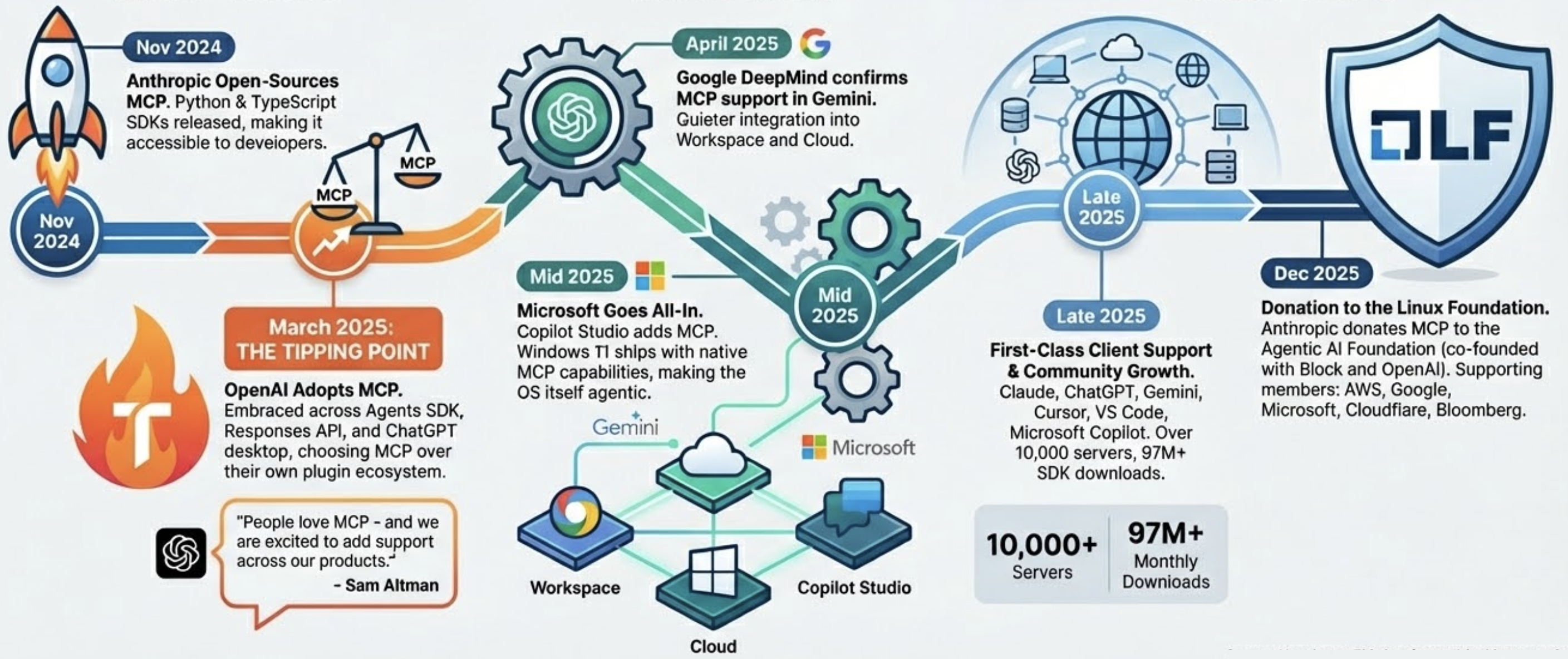
The tipping point was OpenAI. They had their own plugin ecosystem — and chose to embrace Anthropic’s protocol instead.
By December 2025, Anthropic donated MCP to the Agentic AI Foundation under the Linux Foundation, co-founded with Block and OpenAI, with backing from AWS, Google, Microsoft, Cloudflare, and Bloomberg.
In just over a year — from internal experiment to shared infrastructure governed by the Linux Foundation.
Closing thought
Models didn’t suddenly become useful because they got smarter.
They became useful because we started giving them ways to act on the world.
MCP is one of the first serious attempts to make that interface sane — a shared protocol that turns the N×M integration problem into N+M, inspired by the same insight that made LSP work for code editors a decade ago.
Not perfect. Not finished. But directionally right — and increasingly, the industry standard.