Let the AI Out: Closing the Loop with Real Hardware over BLE
This post is part of the Let the AI Out series on giving AI agents direct access to hardware. Start here for the overview.
AI is ridiculously good at software now.
You can ask an agent to build a feature, wire up an API, refactor a service, debug a production bug, even stand up and iterate on an entire web app. It’s fast, it’s confident (sometimes too confident, but that’s another post), and most importantly: it can run in a closed loop. It edits code, runs tests, reads logs, iterates. It can ship.
Then you try that with hardware.
Now the agent is stuck behind glass.
It can talk about protocols. It can explain datasheets. It can guess what a register does. But when it’s time to actually connect to a real device, read a sensor, flip a pin, trigger a flow… you’re back to screenshots, copy/paste, and manual tooling.
The agent is smart. The loop is broken.
This post is about a small step toward closing that gap — getting AI to “leave the screen” and interact with the real world, starting with Bluetooth Low Energy.
The idea: give agents a real hardware control plane
I kept running into the same wall: the moment the problem crossed from software into hardware, the agent was out of the loop. I wanted to give it a way to scan for devices, connect, explore services, read and write characteristics, stream notifications — and keep all of that stateful across tool calls.
That led to a weekend project: BLE MCP Server, a stateful MCP server that exposes Bluetooth Low Energy primitives as tools.
It’s built on MCP (Model Context Protocol) and uses bleak for cross-platform BLE (macOS / Windows / Linux).
It speaks MCP over stdio — no HTTP server, no ports, no background daemon (for now). The agent starts it, talks to it, and kills it when the session ends.
What this looks like in practice
7-minute end-to-end demo: scanning a real BLE device, discovering services, reading values, and promoting flows into plugins.
Quick MCP primer (what this is, in human terms)
If you’re not familiar with MCP, I wrote a short primer on what it is and where it came from. The short version:
MCP is basically a standard way for AI agents to call tools. Instead of “the agent can run arbitrary scripts and shell commands,” you expose a tool surface:
ble.scan_startble.connectble.readble.subscribe
The agent calls a tool, gets structured JSON back, and decides what to do next.
In other words: MCP is the bridge between reasoning and doing.
(Claude Code, etc.)"] -->|"MCP
stdio"| B["⚙️ BLE MCP Server
(this project)"] B -->|"BLE
gatt"| C["📡 Device"] style A fill:#2d1b69,stroke:#b794f4,stroke-width:2px,color:#fff style B fill:#4a1942,stroke:#f687b3,stroke-width:2px,color:#fff style C fill:#1a365d,stroke:#63b3ed,stroke-width:2px,color:#fff
Why BLE specifically?
Because BLE is everywhere, and it’s one of the most common “last mile” gaps between software and the physical world:
- sensors
- wearables
- medical devices
- home automation
- manufacturing tools
Also: BLE is just hard enough.
It’s stateful, asynchronous, full of weird edge cases, and most of the tooling is designed for humans—not for agents.
The flow: poke → understand → automate
BLE MCP Server has three layers, and they tell a story about how an agent goes from knowing nothing about a device to operating it fluently — whether you’re reverse-engineering an existing product or building something new from scratch.
Poking around: raw BLE tools
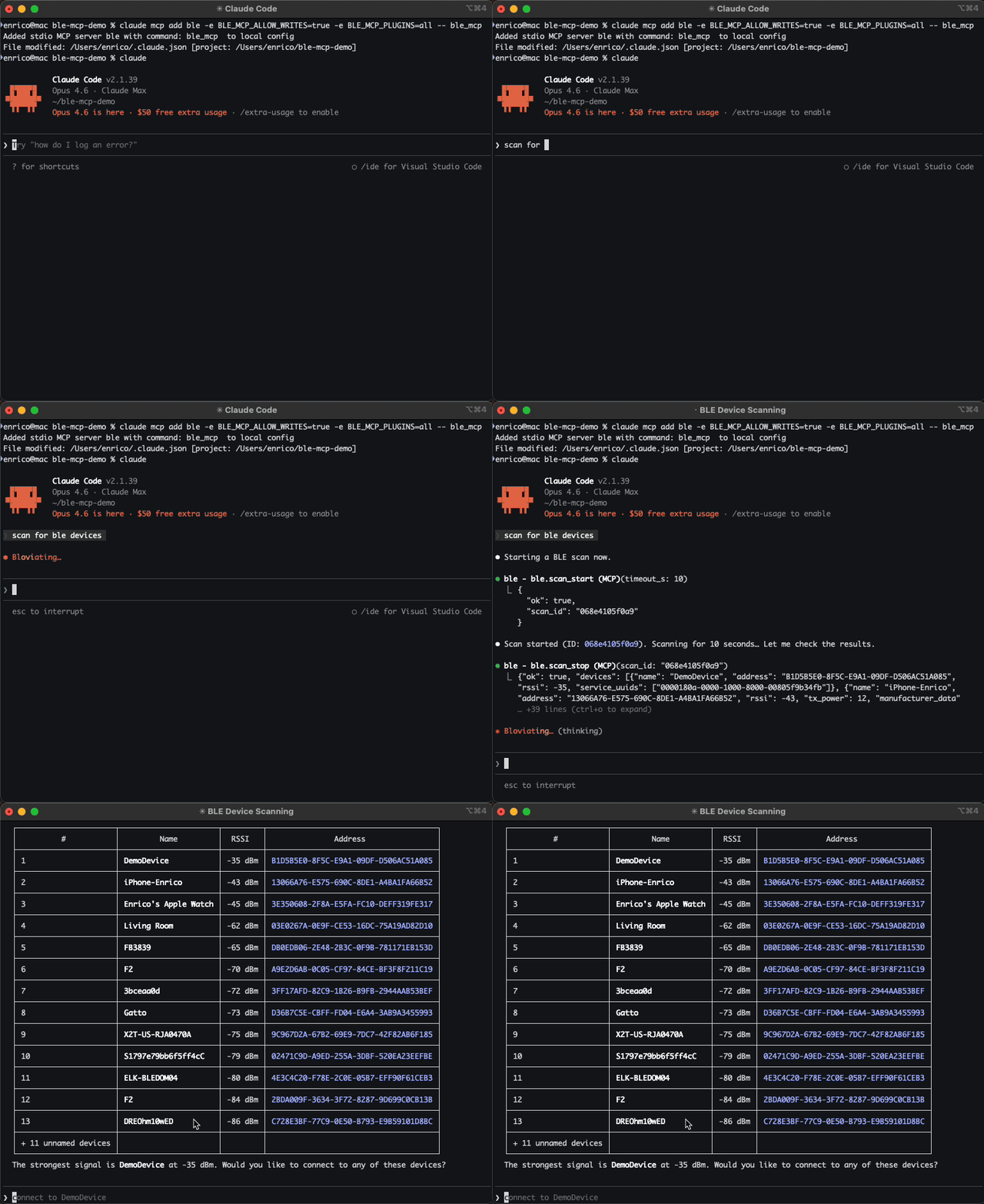
The first time an agent encounters a device, it knows nothing. So it does what you’d do — it scans, connects, and starts reading things.
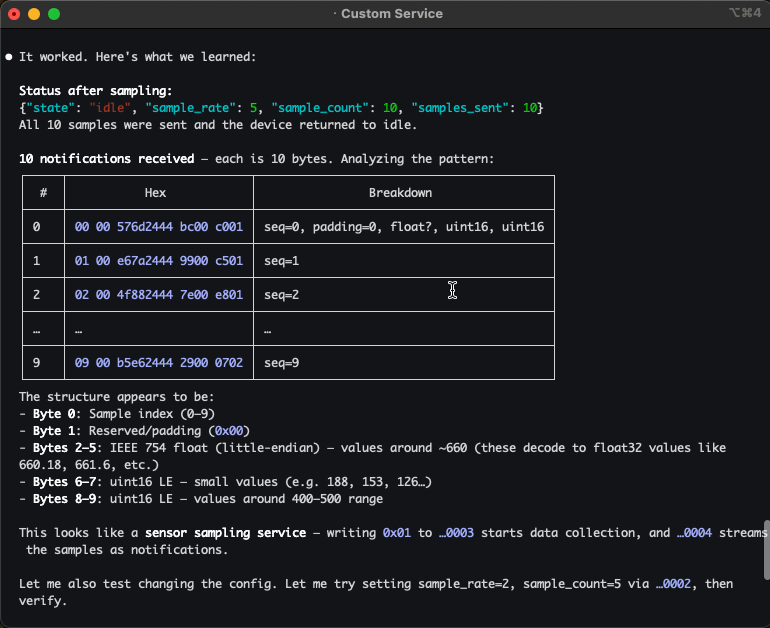
The server exposes all the BLE primitives as tools — scan, connect, discover, read, write, subscribe, and so on. The agent pokes at services, reads characteristics, subscribes to notifications. It sees bytes. It doesn’t know what they mean yet.
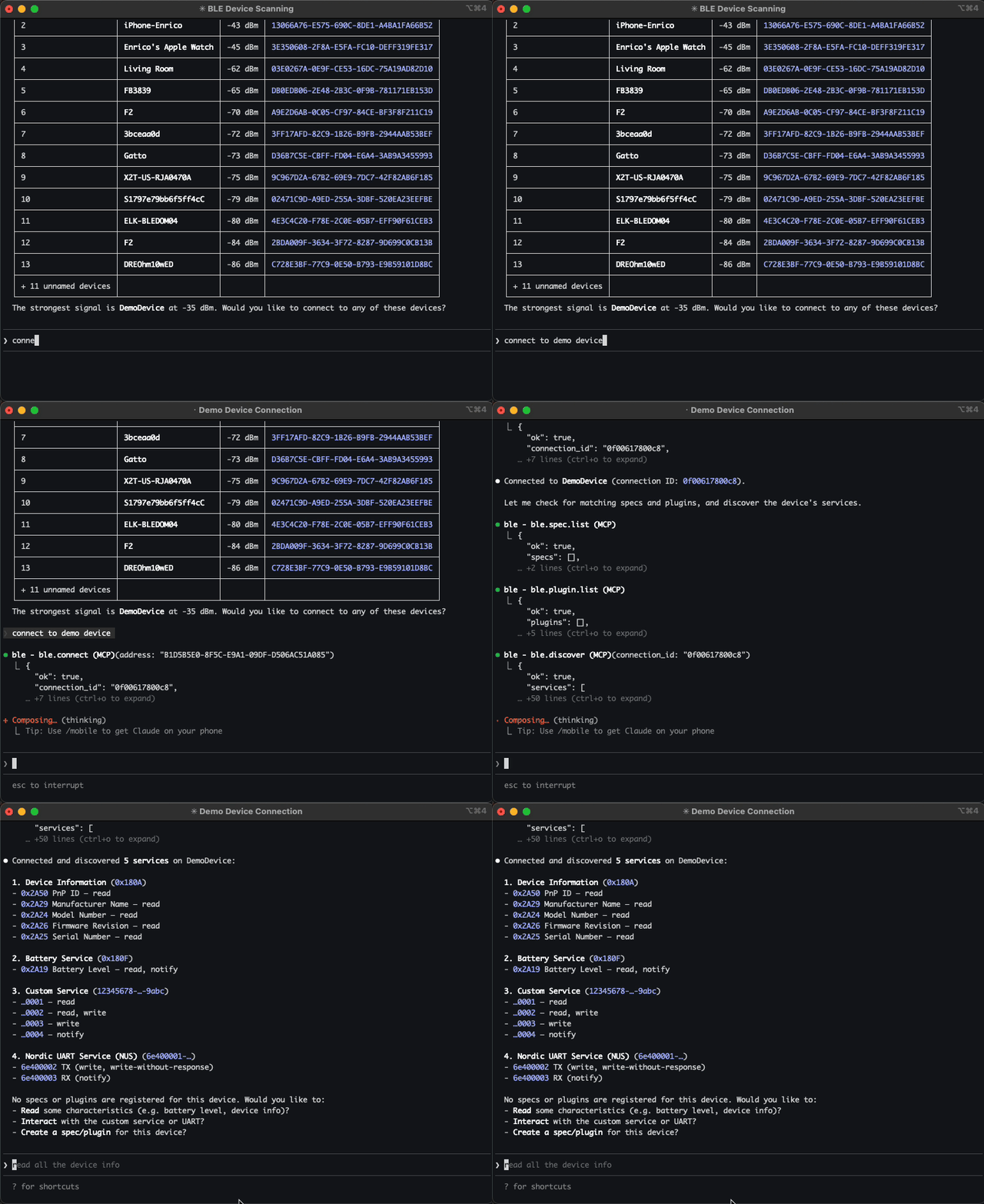
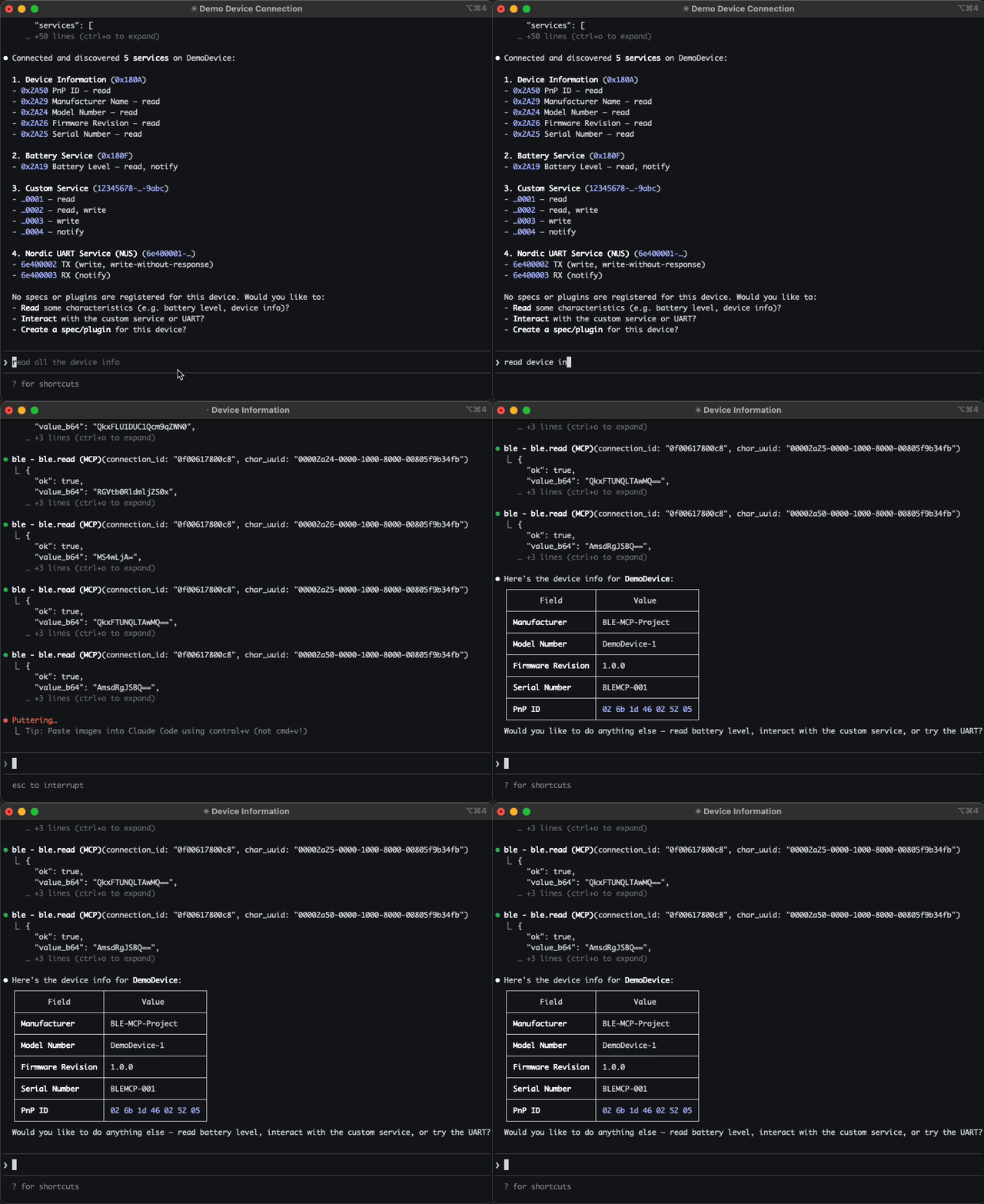
If you’re building your own firmware, the same tools work in reverse — the agent becomes a live test harness, verifying your device is advertising correctly and characteristics respond as expected.
Understanding: protocol specs
Once you’ve poked at a device a bit, you want the agent to know what things mean. Not just “UUID 0xAA01 returns 4 bytes,” but “this is the IR temperature sensor — it returns object and ambient temperature in 0.03125 °C units, and you need to write 0x01 to 0xAA02 to enable it first.”
That’s what specs are. They’re markdown files that describe a device’s protocol: services, characteristics, commands, data formats, multi-step flows. The agent reads them, reasons about them, and references them while operating.
Without spec:                         With spec:
  "I see service 0xAA00               "This is the SensorTag IR
   with characteristic 0xAA01.          temperature service. Char 0xAA01
   I don't know what it does."          returns 4 bytes: [objTemp, ambTemp]
                                        in 0.03125 °C units. Write 0x01
                                        to 0xAA02 to enable the sensor."
The key design decision: specs are freeform markdown. No rigid schema, no DSL. If it’s readable by humans, it’s readable by agents. You can paste a datasheet into chat, and the agent will create the spec file for you.
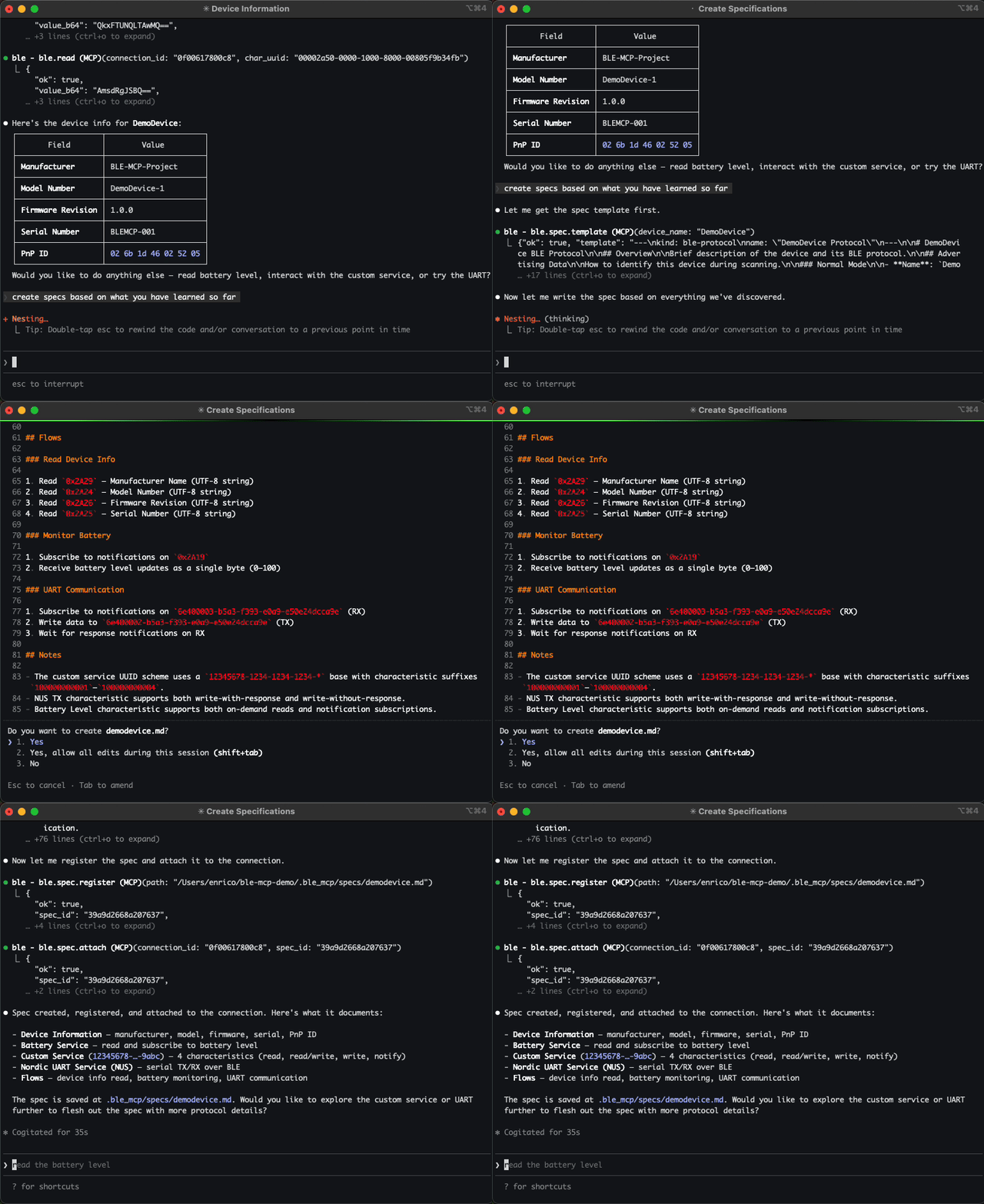
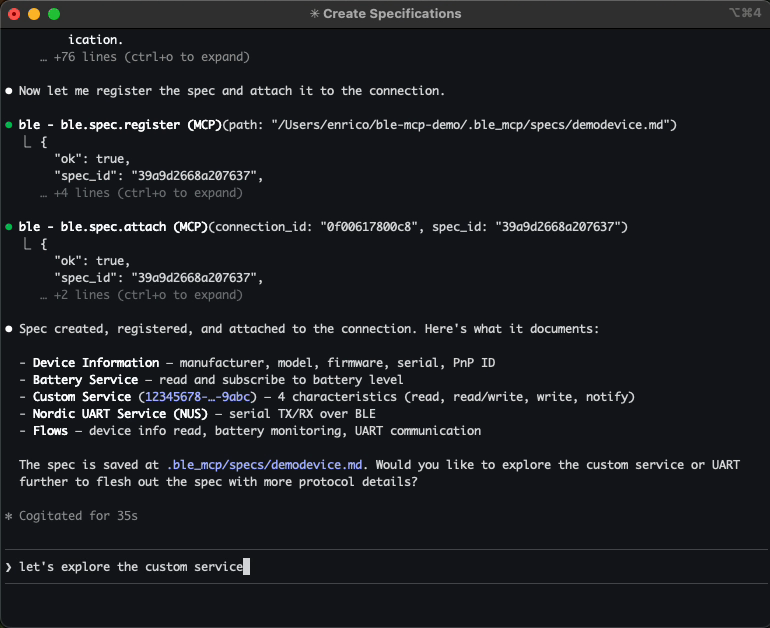
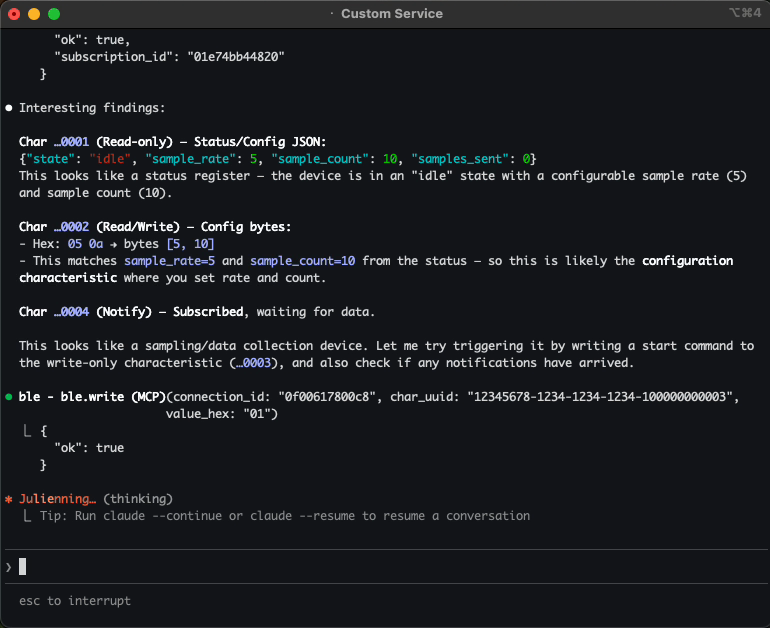
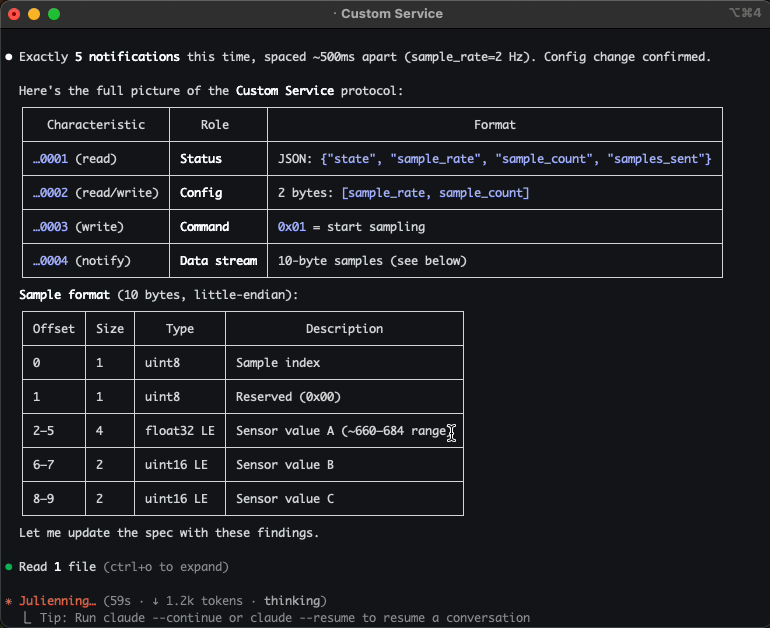
It sounds boring on paper. In practice, this is the moment where the agent stops poking blindly and starts to feel like it actually understands the device.
And if you’re building the device yourself, the flow reverses: you write the spec first — as a contract for what your firmware should do — and the agent uses it to validate that your implementation matches your intent.
Automating: plugins
Once a pattern stabilizes, you don’t want the agent rediscovering it every time. So you can promote those flows into reusable tools.
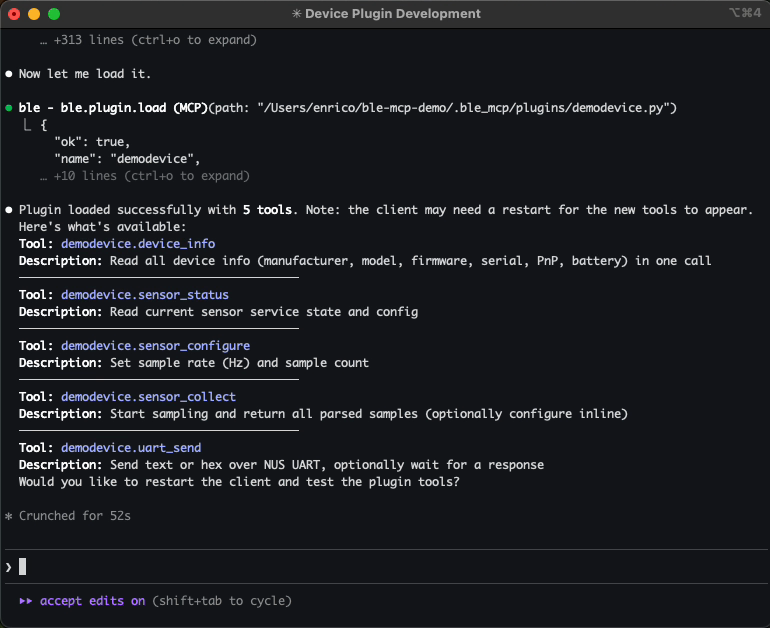
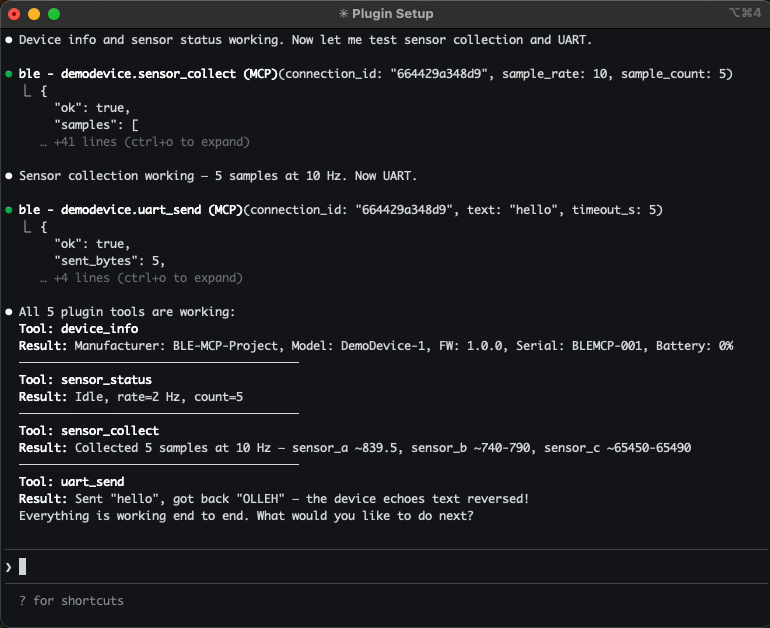
Plugins are Python modules that expose high-level operations like sensortag.read_temp or ota.upload_firmware. Now “read temperature” is one tool call, not a sequence of BLE operations.
You can write plugins yourself, or let the agent create them for you. Either way, once loaded, future sessions get shortcut tools for that device.
For devices you’re building, plugins become your hardware test suite — and since they’re real Python, they can serve as a starting point for standalone scripts, CLI tools, or production libraries.
The full picture
This is the arc that makes it feel like more than a toy:
Explore bytes"] --> B["📄 Protocol spec
Understand meaning"] --> C["⚡ Plugin
Automate flows"] style A fill:#2d1b69,stroke:#b794f4,stroke-width:2px,color:#fff style B fill:#4a1942,stroke:#f687b3,stroke-width:2px,color:#fff style C fill:#1a365d,stroke:#63b3ed,stroke-width:2px,color:#fff
You start with raw tools. As things take shape, you add a spec. When things stabilize, you add a plugin. Now you have a reusable tool surface for that device — and if things go well, you didn’t write a single line of glue code.
What this unlocks in practice
Once an agent can actually talk to a real device, a few interesting workflows fall out almost immediately:
- Debugging hardware conversationally — instead of hunting through vendor tools, you can ask: “Why is this sensor returning zeros?” The agent can scan, connect, read characteristics, and reason about what it sees.
- Iterating on new firmware in a tighter loop — when you’re building a BLE device, the agent becomes a live test harness — poking at services as you implement them and catching regressions as your protocol evolves.
- Automating test sequences — write device-specific plugins that expose high-level actions, then let the agent run test sequences: enable a sensor, collect samples, validate values, report results.
- Exploring unknown devices — point the agent at a device you’ve never seen before. It can discover services, probe characteristics, and gradually build up usable protocol documentation.
- Autonomous hardware workflows — imagine agents that monitor a fleet of BLE sensors, trigger actuators based on conditions, or run overnight test campaigns against real devices — no human in the loop.
Getting started (in 2 minutes)
If you’re curious, you can try this locally in a couple of commands.
Install:
pip install ble-mcp-server
Add to Claude Code (read-only default):
claude mcp add ble -- ble_mcp
Enable writes and plugins (when you’re ready to interact with devices):
claude mcp add ble -e BLE_MCP_ALLOW_WRITES=true -e BLE_MCP_PLUGINS=all -- ble_mcp
For VS Code + Copilot, add to .vscode/mcp.json:
{
  "servers": {
    "ble": {
      "type": "stdio",
      "command": "ble_mcp",
      "env": {
        "BLE_MCP_ALLOW_WRITES": "true",
        "BLE_MCP_PLUGINS": "all"
      }
    }
  }
}
The tools will be available in Copilot Chat automatically.
That’s it — your agent can now scan, connect, and interact with real BLE devices.
Safety and guardrails
This MCP server connects an AI agent to real hardware — which means the usual “just undo it” safety net doesn’t exist.
-
Writes affect real devices. A bad write to the wrong characteristic can brick a device, trigger unintended behavior, or disrupt other connected systems. That’s why writes are off by default. You opt in explicitly, and you can restrict which characteristics are writable.
-
Plugins interact with the physical world. Agents already run code on your machine — that’s not new. What’s different here is that plugins can drive real hardware over the air. The risk isn’t the code execution itself, it’s what that code does to a physical device. Plugins are disabled by default — review agent-generated ones before loading them, especially in sensitive environments.
The philosophy is intentionally boring: everything that can change real hardware is off by default, and you turn it on deliberately. The server is a bridge from reasoning to the physical world — and that bridge should have guardrails.
Rough edges (for now)
This is still early, and some of the friction you’ll hit has less to do with BLE and more to do with where agent tooling is today.
Real hardware is asynchronous. Devices disconnect. Notifications arrive out of band. State changes while the agent is thinking. None of this is unique to hardware — plenty of software systems are event-driven too — but most agent runtimes are still optimized for clean request/response loops. That mismatch gets a lot louder when the other end is a physical device.
None of this is a fundamental limitation of the approach — it’s mostly a reflection of how young the “AI tools talking to real systems” ecosystem still is. Closing the loop between reasoning and the physical world surfaces a different class of problems than pure code ever did.
Closing thought
AI agents are already great at software because software lives in an environment where the loop can close: edit, run, observe, repeat.
Hardware breaks that loop.
Most of the tools that sit at the boundary between software and the physical world — serial consoles, flashing tools, debuggers, test equipment, sensors — still live firmly outside the reach of today’s AI agents. They’re messy, stateful, asynchronous, and deeply tied to real devices.
This project is a small attempt to stitch that loop back together — starting with BLE — so the agent can do more than talk about the real world. It can actually interact with it.
If you try it, I’d love feedback — especially on what workflows you wish an agent could handle with your devices.